SPONSORS

Tuesday, 31 January 2012

Going Viral in Traveling Niche: 5 Interesting Infographics About Travel

The idea of traveling the world appeals to the vast majority of us but, for those of us lucky enough to block off the time and money necessary to roam, one very important question remains: where exactly should I go? The Earth is a big place with many alluring destinations, each of them competing healthily for your travel dollars.

One of the weapons used in the modern global community’s battle over attracting tourists is the simple infographic, a visualized piece of media and information aimed at piquing your interest enough to get you on a plane and into a local hotel as soon as possible.

If you’re thinking of traveling and need something to help push your decision of locale over the edge or you’re simply a geography buff who enjoys what each corner of the world has to offer, you’ll love these interesting travel infographics.

On Yer Bike Infographics

For the bicycling enthusiast comes this poster, created to lure travelers to Amsterdam for what is probably not the first of the country’s draws to come to mind. Based on data gathered for what went on to become the winning entry in the Copenhagenize list of the best urban cycling locations in Europe, this infographic offers tidbits about the number of bikes on the roads and paths in the Netherlands, the number of them that are stolen and recovered, and some of the beautiful spots one can visit using nothing more than two wheels.
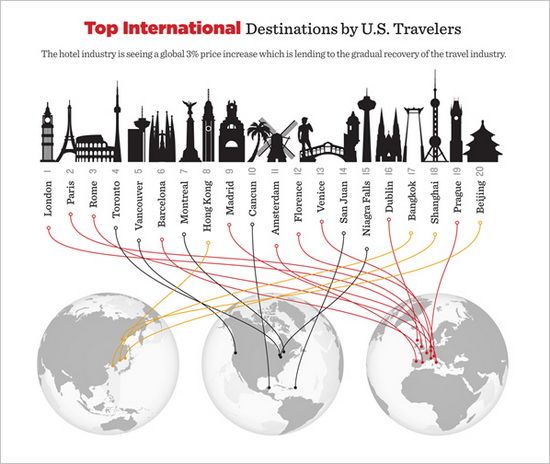
Hotels.com 2011 Price Index Infographics

One of the most important things to consider when you’re thinking about taking a faraway vacation are hotel costs and Hotels.com does a great job with their annual infographic outlining both current hotel prices and changes, whether higher or lower,around the world and across the United States in particular. If cash-flow is an issue, considering visiting Portugal instead of Switzerland!
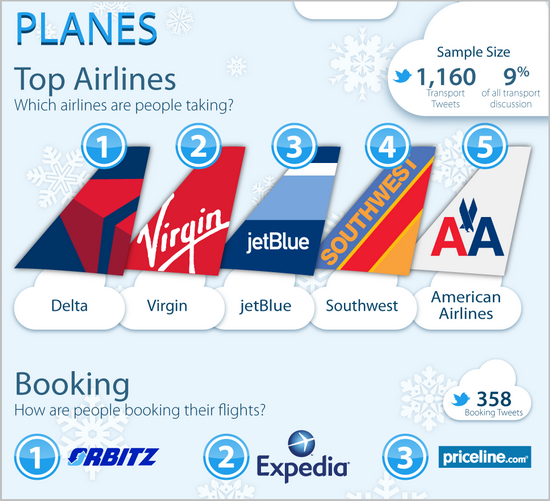
Winter Travel in the United States Infographics

Social media trend analytics group MashWork released this infographic towards the end of the 2011 holiday season outlining in great detail the methods of travel, final destination and booked accommodations of people planning to travel, all by analyzing more than 20,000 Twitter status posts through November and December of last year.

The cool array of data gives you the ability to rate airlines, train service providers and car rental agencies by their general usage numbers, determine the most sought-after holiday destinations and book the hotels most often on the mind of would-be travelers looking to visit areas of the continental United States.
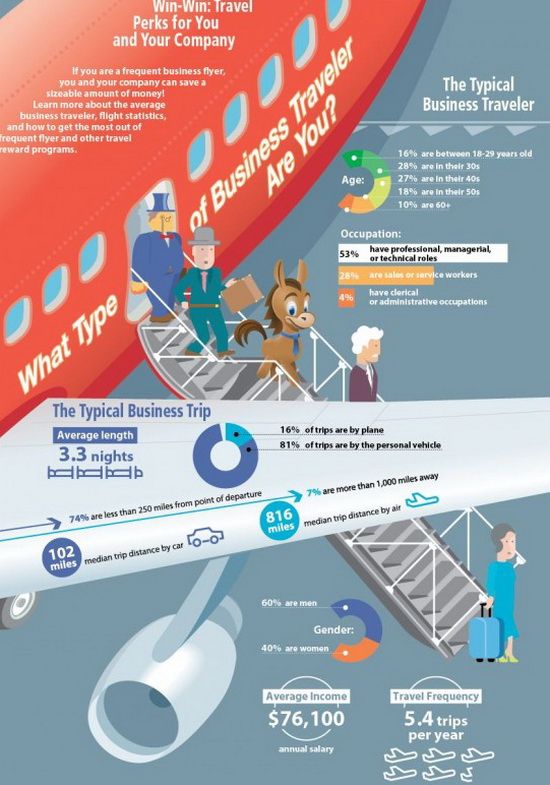
Business Travel Infographics

For travelers with goals more official than grandma’s home cooking comes this infographic from Credit Donkey aimed at American travelers headed to both domestic and foreign destinations. With data presented on everything from the average business traveler’s profile to the most-used airports along with tips on how to spend and save that limited business travel expense account, this single infographic has lots to offer American travelers when they head out on business.
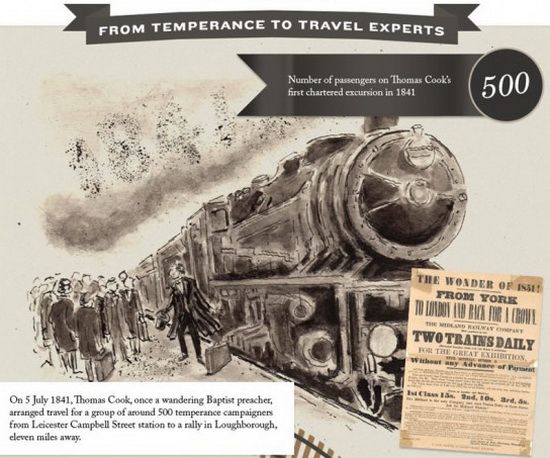
A History of British Holidaymaking Infographics

In our ever-connected world, traveling can be done vicariously in more ways than one, making infographics like this one an interesting read whether you plan to visit the United Kingdom or not. Created by a British tourism agency and focused in great part on the exploits of adventurer and explorer Thomas Cook more than 170 years ago, this graphic leads you through a brief history of holidaymaking in Britain over the past two centuries.

From the advent of inexpensive rail lines and the motor car itself to the number of visits made outside the country by U.K. travelers in 2011 (a whopping 55 million!), the tidbits to be gleaned here are interesting under any circumstances.

Conclusion

Infographics, no matter how much detail is crammed into them, shouldn’t be your sole source of information about travel methods or destinations but they can most definitely serve as eye-catching sources of inspiration and basic details when you’re planning a trip; in a world filled with exciting travel opportunities with businesses all competing for your tourist dollars, you’ll need all of the help you can get in narrowing down your list of hotspots!

Annie blogs on traveling and adventure for GrandCanyonTourist.com – check out our site for the great selection of adventure and sightseeing coupons including Maverick Helicopters, Grand Canyon Helicopter Tours, etc.

local search engine optimization local search marketing services

Going Viral in Traveling Niche: 5 Interesting Infographics About Travel

The idea of traveling the world appeals to the vast majority of us but, for those of us lucky enough to block off the time and money necessary to roam, one very important question remains: where exactly should I go? The Earth is a big place with many alluring destinations, each of them competing healthily for your travel dollars.

One of the weapons used in the modern global community’s battle over attracting tourists is the simple infographic, a visualized piece of media and information aimed at piquing your interest enough to get you on a plane and into a local hotel as soon as possible.

If you’re thinking of traveling and need something to help push your decision of locale over the edge or you’re simply a geography buff who enjoys what each corner of the world has to offer, you’ll love these interesting travel infographics.

On Yer Bike Infographics

For the bicycling enthusiast comes this poster, created to lure travelers to Amsterdam for what is probably not the first of the country’s draws to come to mind. Based on data gathered for what went on to become the winning entry in the Copenhagenize list of the best urban cycling locations in Europe, this infographic offers tidbits about the number of bikes on the roads and paths in the Netherlands, the number of them that are stolen and recovered, and some of the beautiful spots one can visit using nothing more than two wheels.

Hotels.com 2011 Price Index Infographics

One of the most important things to consider when you’re thinking about taking a faraway vacation are hotel costs and Hotels.com does a great job with their annual infographic outlining both current hotel prices and changes, whether higher or lower,around the world and across the United States in particular. If cash-flow is an issue, considering visiting Portugal instead of Switzerland!

Winter Travel in the United States Infographics

Social media trend analytics group MashWork released this infographic towards the end of the 2011 holiday season outlining in great detail the methods of travel, final destination and booked accommodations of people planning to travel, all by analyzing more than 20,000 Twitter status posts through November and December of last year.

The cool array of data gives you the ability to rate airlines, train service providers and car rental agencies by their general usage numbers, determine the most sought-after holiday destinations and book the hotels most often on the mind of would-be travelers looking to visit areas of the continental United States.

Business Travel Infographics

For travelers with goals more official than grandma’s home cooking comes this infographic from Credit Donkey aimed at American travelers headed to both domestic and foreign destinations. With data presented on everything from the average business traveler’s profile to the most-used airports along with tips on how to spend and save that limited business travel expense account, this single infographic has lots to offer American travelers when they head out on business.

A History of British Holidaymaking Infographics

In our ever-connected world, traveling can be done vicariously in more ways than one, making infographics like this one an interesting read whether you plan to visit the United Kingdom or not. Created by a British tourism agency and focused in great part on the exploits of adventurer and explorer Thomas Cook more than 170 years ago, this graphic leads you through a brief history of holidaymaking in Britain over the past two centuries.

From the advent of inexpensive rail lines and the motor car itself to the number of visits made outside the country by U.K. travelers in 2011 (a whopping 55 million!), the tidbits to be gleaned here are interesting under any circumstances.

Conclusion

Infographics, no matter how much detail is crammed into them, shouldn’t be your sole source of information about travel methods or destinations but they can most definitely serve as eye-catching sources of inspiration and basic details when you’re planning a trip; in a world filled with exciting travel opportunities with businesses all competing for your tourist dollars, you’ll need all of the help you can get in narrowing down your list of hotspots!

Annie blogs on traveling and adventure for GrandCanyonTourist.com – check out our site for the great selection of adventure and sightseeing coupons including Maverick Helicopters, Grand Canyon Helicopter Tours, etc.

search engine optimisation companies search engine optimisation company london

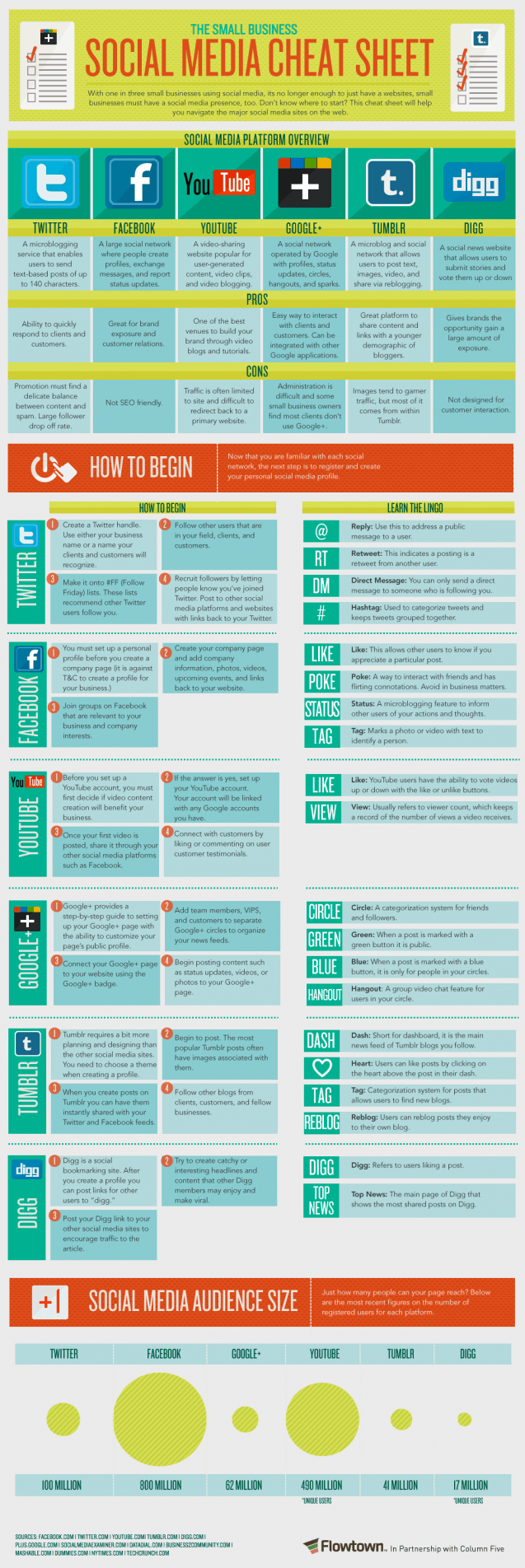
Need a Cheat Sheet for Socal Media?

Well, Flowtown made a fantastic one and we want to share it with you. Now obviously many of us do not need this cheat sheet, but there are plenty of people that do! Like clients and parents. I have emailed this to many this morning. I also like the representation of audience sizes for clients. So take a peak at the infographic below and enjoy (and email to those people that keep asking you what “this is” or “that is” and what “this means”).


cardiff search engine optimisation cheap search engine optimisation

3 Essential Features For Multinational Content Delivery

Most multinational sites will serve content via a Content Delivery Network (CDN). But not all CDNs are equal: what should you look for to get the best bang for your buck in Search Engine Result Pages (SERPs) across the globe? Content Delivery Network Map

Since Google’s Caffeine update to its server infrastructure back in June 2010, Google has stepped up the importance of page load speed to its core algorithm. But page load speed has always been important to Google in providing a good searcher experience for Google searches.

And this is a logical stance if you take a second to think it through.

After all, if you consistently found that despite throwing up relevant results your searches continually returned sites which took ages to load, you’d seriously consider using a different search engine too, right?

So what causes slow page load times?

Well, the top five most common causes (in no particular order) which are cited in most large-scale studies of page response times, and which are tackled by all of the tools out on the market today are:

  • Poor Caching Controls
  • High Request Overheads
  • Large Payload Sizes
  • Long Round-Trip Times
  • No Device Optimisation

The details around each type of issue are well documented elsewhere, for example in Google’s Web Performance Best Practice or Yahoo! Developer’s performance notes, so I won’t run over them again here.

All we need to know is that the number one – and most common – impact to page load times is poor caching controls. However, for multinational sites the very specific caching issue we should look to solve is ‘Proxy Caching’.

Proxy Caching is the practice of storing static resources on public web proxy servers. This is the type of advantage we can leverage in multilingual campaigns targeting multiple territories using a well distributed CDN.

So what should we be looking at to evaluate the quality of a CDN?

1. Well Distributed Edge Nodes

The most important criteria. The location of the CDN’s Edge Nodes should be close to the searcher’s location, this means that having all their servers in just Europe or the US would disadvantage searchers from Asia, for example.

Track down the CDN’s network map and match it against the locations you’re targeting in your search marketing startegy: are all the key countries covered?

If not, you’ll likely still see multiple hops are required for page requests and much of the speed optimisation is lost.

Try testing a CDN’s claims by performing a Ping & Traceroute from an IP within one of your target markets. Use a free multi-territory ping service such as that offered by dotcom-monitor.

2. Configurable Static Caching Of Dynamic Content

You may have noticed that Proxy Caching is concerned with static content.

If your site is built dynamically (and if it’s targeting multiple countries and languages, then it almost certainly is), then regardless of how well your static assets are cached, if big chunks of your body HTML requires dynamic loading then speed gains are for naught.

So make sure your CDN allows you to configure only those essential dynamic areas that should be served directly from your own servers, and dump all the rest of the content to their caching controls.

In 99% of cases, ‘essential’ dynamic areas are often not all that essential, so take time to determine precisely what functionality you need to retain control of on your own servers, and allocate your own resources to focus on its delivery.

For example, updates on your homepage about latest news do not count as ‘essential’ dynamic content.

Depending on your flavour of code, you will likely find a function that allows you to specify CDN information for static files or cache content generated dynamically such as Django’s STATICFILES_STORAGE, which also gives you an easy way to switch providers should you discover the CDN isn’t delivering on its response time promises.

3. Implementation Convenience & Performance Analytics

Many of the more recent CDNs offer superb ease of use when configuring, and speaking as a battle hardened agency-side technical support, that goes a long way in making it into favour with your client’s technical team’s shortlist.

For all the technical sophistication possible with CDNs, the ability to largely hand over the configuration to a few simple WYSIWYG steps in a provider interface has a lot going for it in terms of implementation overhead.

It also prevents errors creeping in to the delivery path, most of which can be critical issues for an SEO’s strategy: a huge benefit.

With such providers, implementation is usually just a case of altering the relevant DNS records to point to their network, which is a 5 minute job.

Making sure the CDN implementation is performing therefore becomes the main criteria for judging if your provider is delivering for you. Look for transparent reporting on traffic location, any user-agent or ‘known threat’ filtering, IP blocking, caching performance, and page load time overview by location.

Ideally, look for integration with your existing Analytics package as this allows you to combine into your standard reporting speed and performance metrics which are business critical to an SEO’s job these days.

Opinions expressed in the article are those of the guest author and not necessarily Search Engine Land.

Related Topics: Google: SEO | Multinational Search | SEO - Search Engine Optimization | SEO: General | SEO: Host Crowding & Clustering

search engine marketing experts search engine marketing firm

Friday, 27 January 2012

Optimize Your Social Media Schedule: 4 Tips for Avoiding the Social Media Time Suck

optimize social media time

Making the time to execute on a social media strategy can rattle even the most experienced marketers.  Unlike traditional marketing, social media marketing can present many different challenges and distractions.  According to a study by eMarketer 73% of marketers say finding the time to create content as their biggest marketing challenge.

I recently ran a poll of @TopRank Twitter followers to get a sense of how they spend their time online.  I asked “If you had only 20 minutes a day to spend on social media what would you focus on?”  Some of the answers we received were:

  • @henryroominates – “I would try to connect with powerful Twitter users and Tweet content from my blog.”
  • @SebastianX – “I’d read my Twitter Followanyday List.”
  • @Paco_Belle – “Look at 2-3 Twitter lists, couple circles on G+, scroll Facebook timeline & look through my RSS feeds for new things.”
  • @Paramountbuzz – “Engaging others…doing it now.”
  • @GreenDolphin_ – “My RSS feed, Twitter, Pinterest, and Facebook.”

If you are involved with implementing social media marketing, you know that 20 minutes a day just won’t cut it.  On top of implementing social media tactics, there’s also the task fo staying current. Lee’s post “11 Ways to Get Smarter & Stay Current in a World of Social Information Overload“ outlined how much time can be involved using social tools to collect, filter and curate social media marketing knowledge.

Avoiding Shiny Object Pitfalls

Reuters estimates that the average worker loses 2.1 hours of productivity every day to interruptions and distractions.  To avoid wasting time begin by prioritizing your week.  While it’s true that unexpected issues can come up plan for the best and the worst.  If you have 3 hours per day on average to complete tasks related to social media strategy what will you get accomplished in those 3 hours?  If you were only to have 1.5 hours per day what would you want to get accomplished?  Proper planning will lead to improved productivity and efficiency.  Also, take some time to determine what your top distractions are and eliminate them.

Optimize for Productivity

Focus on what will have the largest impact on your productivity. Determining what time of day you are most productive, and which activities are most significant will help you to stay on track.  Are you an early riser, night owl, or somewhere in between?  Creating a daily schedule and routine can significantly improve your productivity.  You will also want to keep in mind statistical data which points to the best times of day and days of the week for engaging in social media activity.  A recent infographic by KISSmetrics on “The Science of Social Timing” provides valuable insight into the best times of day to share or engage on sites like Facebook and Twitter.  Some of the findings include:

Twitter

  • 5pm – best time to Tweet for re-tweets
  • 1-4 per hour – most effective frequency of Tweets
  • Midweek & Weekends – best days to Tweet
  • Noon & 6pm – best time to Tweet for increase Click Through Rates

Facebook

  • Saturday- best day to share on Facebook
  • Noon- most effective time to share on Facebook
  • .5 per day – best sharing frequency

Tips for an Optimized Focus

Now lets talk about some no brainer “don’ts” that the many of us “do”.  Let me know if any of these sound familiar to you:

  • Your best friend is having problems with their significant other so you keep your phone close, just in case…
  • It’s baseball season and your team is playing but you don’t have the day off, thank goodness for internet radio right…
  • You have email anxiety which forces you to check email every couple minutes because you never know what you might miss…
  • One of your colleagues is obsessed with chatting online and pings you every couple minutes with a question or joke…
  • You’re scheduling Tweets, posting on your personal facebook page, and reading Psychology Today all at the same time, because after all you are a master multi-tasker…

I too have often thought that I could do everything at once.  A balancing act acquired from years of having too much to do, and not enough time.  I considered multi-tasking an art form and a higher form of organization than my counterparts who only focused on one thing at a time.  I could not have been more wrong.  In recent years I’ve had to buckle down and force myself to devote all of my attention to one task at a time.  I’ve found that the quality of my work has improved and the level of my stress has decreased significantly.  Some tactics that have worked for me include:

  • Closing my email when I’m working on social media tasks
  • Close all Internet windows and tabs except for the one I need to work on
  • Disabling chat or closing chat windows to avoid distraction
  • Pick 15 minutes a day to indulge in activities such as checking personal social media profiles, responding to texts, or chatting with friends.
  • Spend 30 minutes to an hour each morning reviewing emails and responding, do the same thing before leaving at the end of the day.
  • It is significantly easier to stick to your schedule if you are working ONLY on the tasks you have scheduled in the time allotted.

Tools for Optimizing Your Time

Depending on your available time and social media content strategy, there are many tools that can help you accomplish more with less time.  Below are three different types of tools that social media marketers can use to get the most out of their time:

Curation Tools – good for quickly gathering and automatically sharing content

Social Aggregators & Management Tools –  follow and engage with multiple platforms

Social Bookmarking – effective means of organizing and storing social bookmarks

Next Steps

I’m sure you’ll agree that focus and time management are something that most of us can relate to.  Based on what was covered in this post, consider the following questions and determine what you can do to better focus on the tasks at hand:

  • What are your top 3 social media goals and do you have a plan for reaching them?
  • How much time can you dedicate each day to using tactics to reach these goals?
  • What steps can you take to improve your focus while completing social media activities?
  • Which type of tool: curation, aggregator, or social bookmarking can you use to help save time?

If  you are looking for additional tips on Optimizing your SEO, social media, and content strategies be sure to take a look at the new book: “Optimize: How to Attract & Engage More Customers By Integrating SEO, Social Media, and Content Marketing.”

search engine marketing sem search engine marketing service

Google+ Now Lets Users add Nicknames or Pseudonyms

Google+’s Common Name Policy initially stated that only real names and identities will reside on the young social network. In fact, Google started deleting accounts which violated the rules last summer. In response to this, popular blogger Robert Scoble, who goes with the online pseudonym “Scobleizer”, pressed Google’s Senior Vice President for Engineering Vic Gundotra about the policy.

As a result, the seven-month old social network now allows nicknames and pseudonyms for its users. In addition to nicknames and pseudonyms, the young social network also supports alternate, maiden, and other script names.

Google shared on Mashable that the changes of the Common Name Policy will only affect less than 0.1% of Google+ users. Among that small number are companies who are moving to Google+ Pages. The rest are just users who want to include nicknames on their profiles.

Adding a Nickname on Google+

To add a nickname on your Google+ profile, head on to your Profile or About page. Enter your nickname on the new field, and that’s it. Your nickname will appear on the middle of your actual name or at the end with a parenthesis. However, an option to show only your nickname is unavailable.

Using Pseudonyms for Your Google+

Meanwhile, using pseudonyms on Google+ is a little complicated. It requires evidences such as links or a soft copy of your driver’s license. For the users’ safety, Google said that all evidences will be destroyed once the account verification is complete.

However, this feature is only available for the “established ones.” As Google’s Vice President of Product Bradley Horowitz said, the new naming feature is intended for “people who have earned credit in other social systems and want to redeem that credit in Google+.”

This is Just the Beginning

While the changes in its Common Name Policy indicate that Google+ is listening, it’s not an awakening for them. Horowitz said:

“We care about identity and people being authentic on our service. We realize that what we have now is not the final destination either. This is a journey.”

The changes will make it easier for users to be found by their friends through their nickname. Moreover, celebrated online personalities can proudly wear their label on the young social network. On the other hand, many users still find this as a failed move because they believe that this is one feature that Google+ must have since its launch.

search engine marketing sem search engine marketing service

Wednesday, 25 January 2012

Emergency In Your Area? “Public Alerts” On Google Maps Shows Warnings

Google announced a new layer of data being added to Google Maps for public alerts. If there are emergency alerts in your area, Google will show them to you on the map, with more details on the alert.

You can access it over at google.org/publicalerts. The map will load with a layer of data on top of it. You can search by location to see if there are any alerts in your area or just browse the alerts on the left hand side or on the map. The information is also available directly on Google Maps when you search for events in a location, such as [tornadoes in texas].

Here is a picture of zooming into a magnitude 2.5 earthquake near Cokedale, Colorado.

Clicking on the icon takes you to the alert’s details page that provides detailed information on that alert. From when the event happened, to where it happened, to where the information came from and what you can do about it.

The data comes from US National Oceanic and Atmospheric Administration (NOAA), the National Weather Service, and the US Geological Survey (USGS).

Related Articles:

Related Topics: Google: Maps & Local


internet search engine optimization internet search engine placement

Emergency In Your Area? “Public Alerts” On Google Maps Shows Warnings

Google announced a new layer of data being added to Google Maps for public alerts. If there are emergency alerts in your area, Google will show them to you on the map, with more details on the alert.

You can access it over at google.org/publicalerts. The map will load with a layer of data on top of it. You can search by location to see if there are any alerts in your area or just browse the alerts on the left hand side or on the map. The information is also available directly on Google Maps when you search for events in a location, such as [tornadoes in texas].

Here is a picture of zooming into a magnitude 2.5 earthquake near Cokedale, Colorado.

Clicking on the icon takes you to the alert’s details page that provides detailed information on that alert. From when the event happened, to where it happened, to where the information came from and what you can do about it.

The data comes from US National Oceanic and Atmospheric Administration (NOAA), the National Weather Service, and the US Geological Survey (USGS).

Related Articles:

Related Topics: Google: Maps & Local


natural search engine optimisation natural search engine optimization